
Betafriq Kenya mobile app
The Betafriq Kenya app brings sports betting and casino games to your Android or iOS device with M-Pesa integration for instant deposits. Download takes 45 seconds, installation another minute on most devices.


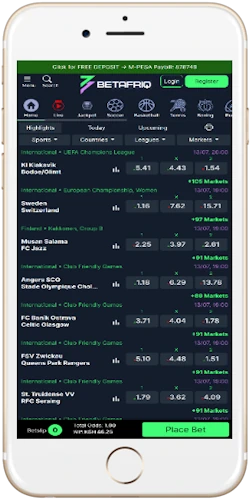
How to download and install the app
Getting the app on your phone takes under 2 minutes. Process differs between Android and iOS because of platform restrictions.
Android installation steps
Android app downloads as a 12MB APK file from the website since Google Play doesn't allow real-money gambling apps in Kenya. Click the Android download button, your phone might show a security warning about unknown sources—that's normal for APK files.
Go to Settings > Security > Unknown Sources and enable it. On Android 16 (which hit Kenyan market in January 2026), navigate to Settings > Apps > Special Access > Install Unknown Apps, select your browser, allow installations. Find the APK in Downloads, tap it. Installation runs for 45 seconds to a minute.
Works on Android 5.0 and above. App size is 12MB, won't eat storage—even entry-level 16GB devices handle it fine.
iOS installation process
iOS doesn't allow APK installations. The workaround is adding the mobile site as a web app to your home screen. Open Safari, go to betafriqkenya.com, tap Share icon, select "Add to Home Screen". Icon appears like a regular app, opens in full-screen without browser bars.
Not quite as smooth as native app, but works. iPhone penetration in Kenya sits around 8-10% of smartphone market anyway.
Key features available in the mobile app
M-Pesa instant deposits
Deposit via M-Pesa STK Push directly from app. Enter amount, confirm on your phone, balance updates in 10-15 seconds. Airtel Money and T-Kash work the same way.
Live sports betting
Bet on FKF Premier League, EPL, La Liga matches as they happen. Odds update every 3-5 seconds during play. Cash out available on most live bets.
Casino games library
Access over 500 slots from Pragmatic Play, NetEnt, Play'n GO. Crash games like Aviator load in under 2 seconds. Live dealer tables from Evolution.
Fast withdrawals
Request withdrawals to M-Pesa or Airtel Money from app. Processing takes 4-6 hours normally, faster on Tuesday afternoons (around 2 hours). Minimum 100 shillings.
Low data consumption
App uses roughly 5MB per 20 bets placed. Efficient for Kenyan mobile bundles. No live streaming saves data—you'd need 200-300MB per match for video.
Dark mode interface
Default dark theme saves battery on AMOLED screens common in mid-range Android phones. Easier on eyes when betting late evening after work hours.
In-app support chat
24/7 live chat built in. Response times average 2-3 minutes during peak hours, under 1 minute late night. Support handles KES or bob when discussing amounts.
Exclusive app bonuses
Mobile-only promotions not available on desktop. First app deposit usually gets extra 10-15% on top of standard welcome bonus. Weekend boosts for FKF matches.
Account sync across devices
Switch between phone and desktop seamlessly. Start a bet slip on laptop at home, finish it on app while commuting. Balance syncs in real-time.
Performance and system requirements
The app runs smoothly on budget Android devices common in Kenya. You don't need flagship Samsung or latest iPhone.
Minimum requirements
Android 5.0 or higher covers basically every phone from last 7-8 years. 1GB RAM minimum, though 2GB handles multitasking better. 50MB free storage needed. Internet connection needs at least 3G, 4G works better for live betting. Safaricom, Airtel, Telkom networks in Nairobi, Mombasa, Kisumu, Nakuru provide adequate 4G coverage.
Performance metrics
App launches in 1.5-2 seconds on mid-range devices. Placing a bet takes 3-4 taps from opening to confirmation. Aviator loads within 2 seconds. Battery drain is reasonable—an hour of active betting consumes 8-10% on a 4000mAh battery. Tecno and Infinix phones with 5000mAh batteries easily last from 6 PM to midnight without charging.
Mobile app versus mobile browser
Both work fine for betting, but app offers some advantages.
| Feature | Mobile App | Mobile Browser |
|---|---|---|
| Access speed | 1.5-2 second launch | 3-4 seconds |
| Data usage | 5MB per 20 bets | 7-8MB per 20 bets |
| Push notifications | Yes | No |
| Offline bet slip | Yes, auto-saves | No |
| App bonuses | Extra 10-15% | Standard only |
| Installation | 12MB APK | Instant access |
Honestly the app makes more sense if you bet regularly—like, multiple times per week. If you're placing occasional weekend accumulators on EPL matches, mobile browser works fine.
Troubleshooting common issues
Most installation problems have simple fixes.
App won't install on Android
Check if you enabled "Unknown Sources" in settings. Samsung devices sometimes have Play Protect that blocks APKs—disable it temporarily. Make sure you have 50MB free storage. If download keeps failing, switch from WiFi to mobile data or vice versa.
App crashes on startup
Clear app cache: Settings > Apps > Betafriq Kenya > Storage > Clear Cache. If that doesn't work, uninstall and reinstall—your balance is stored on server, not device.
M-Pesa deposits not showing
Wait 30-60 seconds after confirming M-Pesa payment. Check your M-Pesa messages for "M-Pesa Confirmed" code. If deposit still doesn't appear after 5 minutes, contact support via in-app chat with your transaction code.
App running slow
Close other apps running in background. WhatsApp, Facebook, TikTok consume RAM on phones with 2GB or less. Restart your phone. Check your internet—if you're on 3G, find a 4G area.